ChatGPT doesn’t fail to raise concerns among people every other day. Many people keep questioning the different features of this platform. And “Can ChatGPT create videos?” is one of them.
The short answer is: no! ChatGPT cannot create videos on its own. ChatGPT is a language model built to process and generate text. It has no native ability to produce, render, or export video files.
But ChatGPT can help you create videos. The key is GPTs, custom AI agents built on top of ChatGPT that connect to external tools. The workflow is straightforward:
- Go to the GPTs store and select a video tool (such as InVideo AI).
- Start a conversation with that GPT.
- The GPT takes your request and calls the external app via API.
- The external app renders the video and returns the result.
ChatGPT is the decision-maker, and the third-party tool is the one doing the actual work. Once you pick the right GPT and start chatting, the rest of the process is surprisingly simple.
This guide covers everything you need to know, including a step-by-step walkthrough of using GPTs for video creation and the top five alternatives worth trying.
How to Make a Video on ChatGPT?
Now that you understand how GPTs work, let’s walk through the actual video generation process, using an external tool – Invideo AI as our example.
Here’s how to do it step by step:
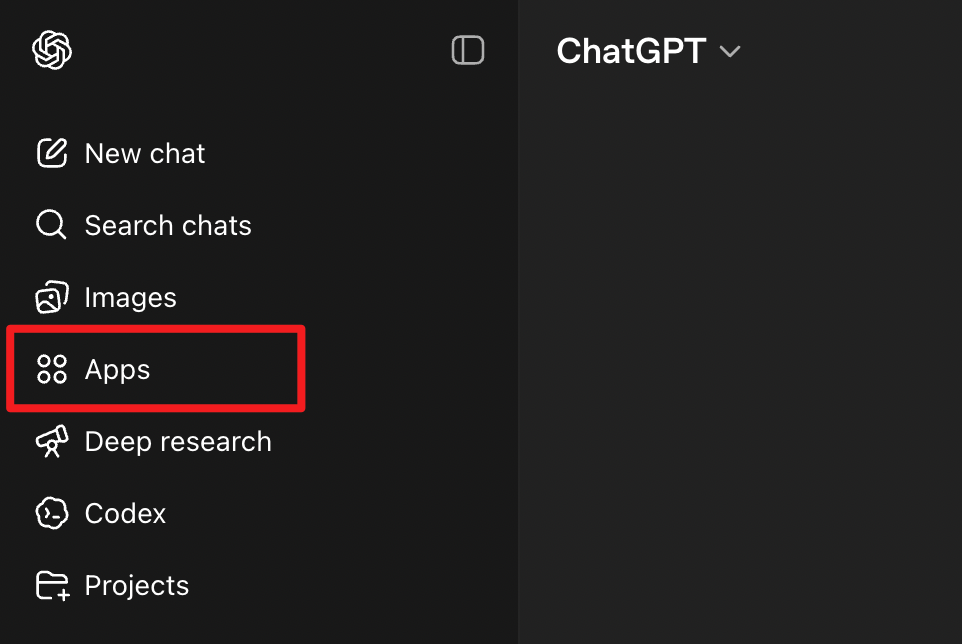
Step 1. Open ChatGPT and click “Apps” in the left sidebar.
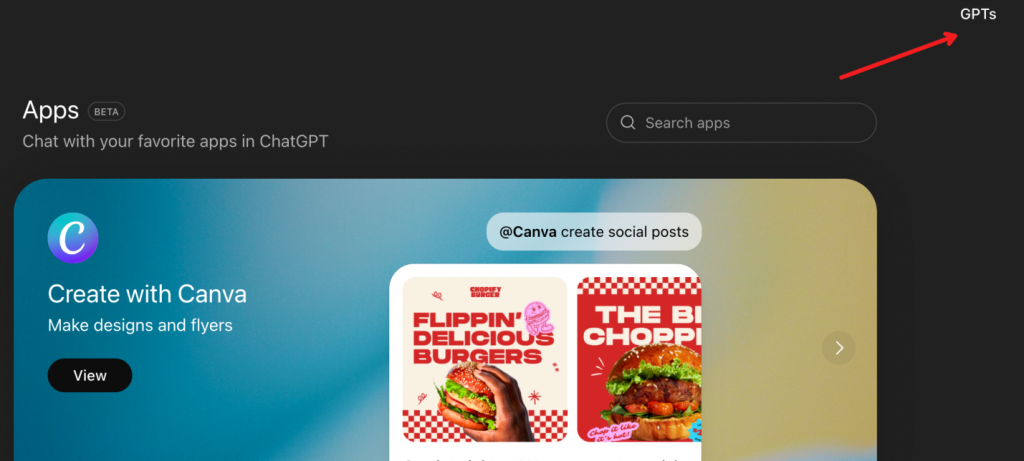
On the Apps page, click “GPTs” in the top right corner.
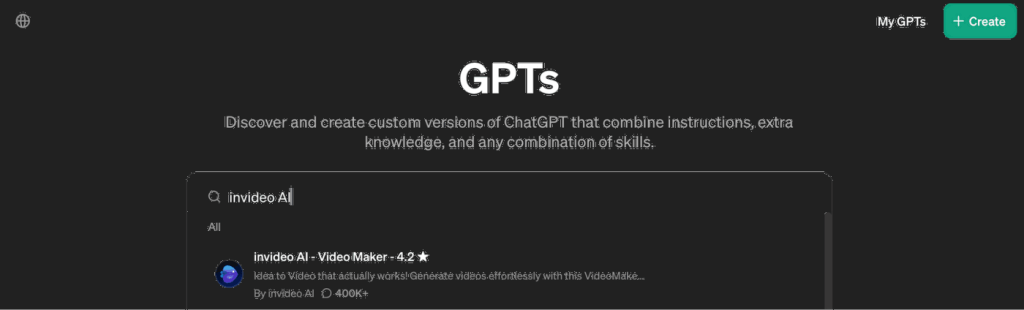
Step 2. Search for “InVideo AI” and select the first option as shown below:
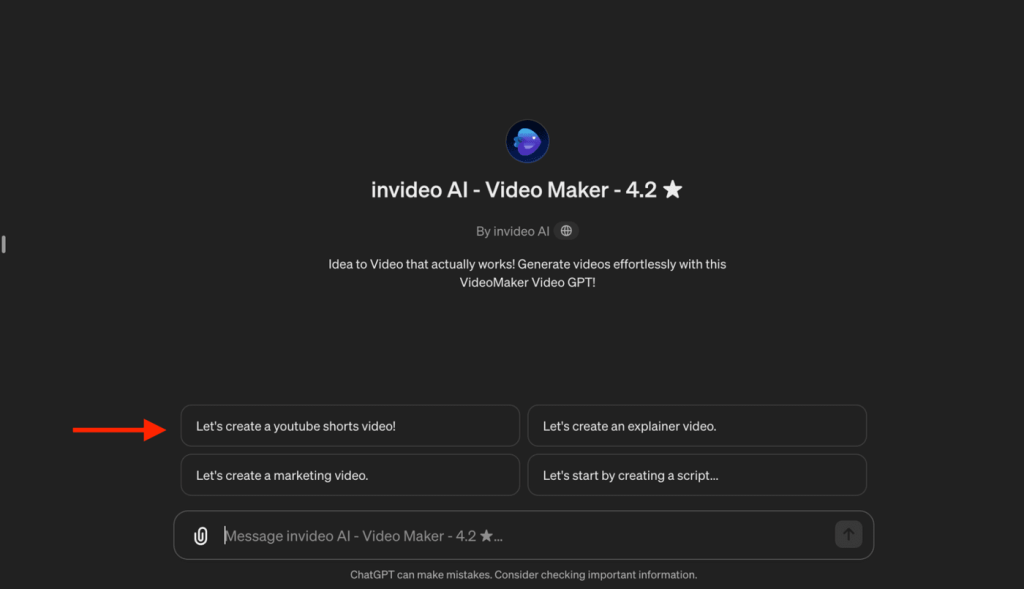
Step 3. Select “Let’s create a YouTube Shorts video!” or simply describe the type of video you wish to make.
Step 4. Next, enter the topic of your video, and GPT will suggest some video options.
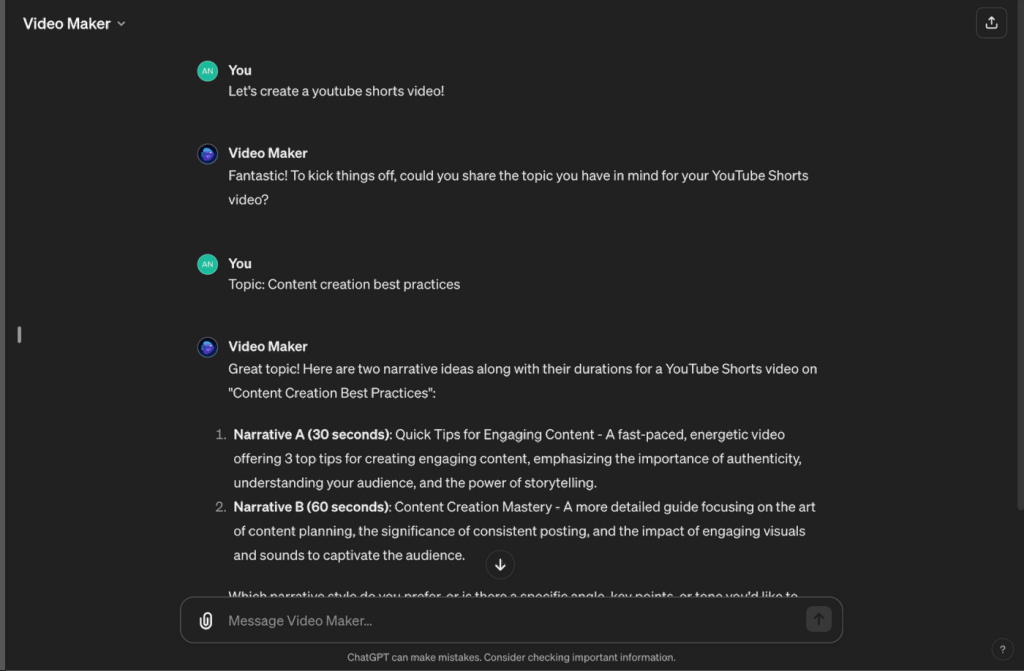
Step 5. Answer with the short option that best suits your needs. For example, we responded “Narrative A”
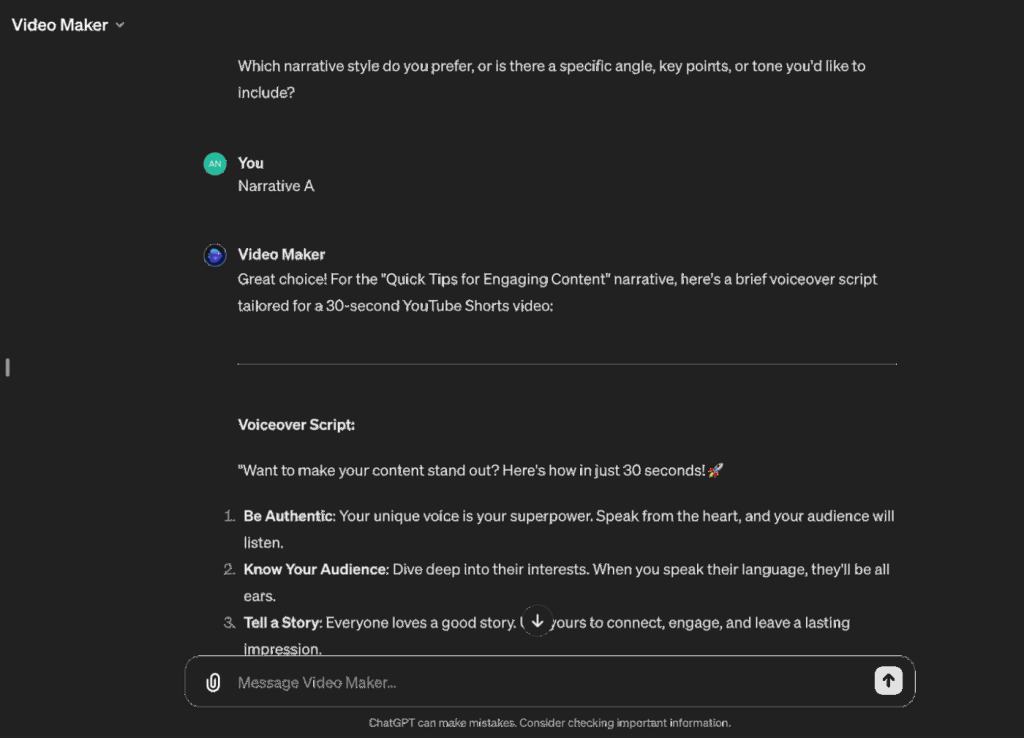
Step 6. Now you have the script ready! If it looks good, ask GPT to proceed and let it process your request.
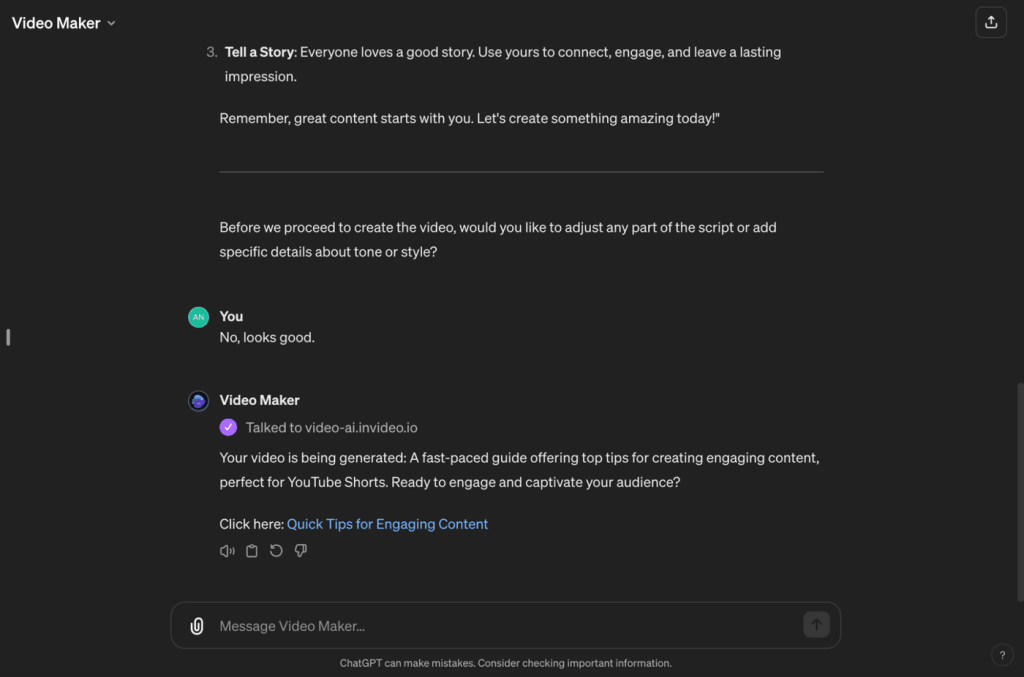
Step 7. The GPT takes your request and calls the external app (InVideo AI) to render the video, then returns the result.
Click the result link. You will be taken to the workspace of Invideo AI. If you already have an InVideo AI account, simply log in. If not, don’t worry. You can create one for free.
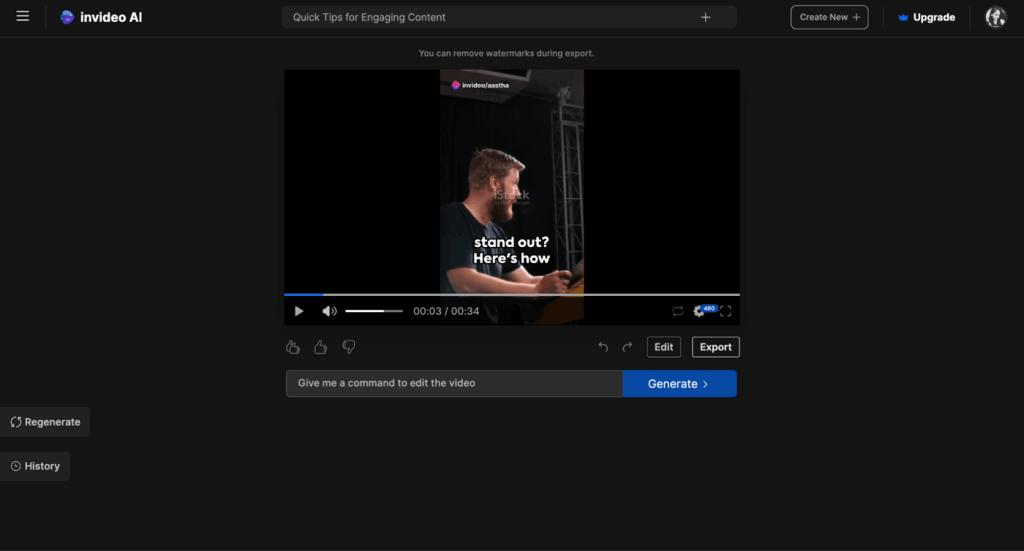
Step 8. Now you can preview your video. If you wish to make any changes in the media or add new ones, click on “Edit” and make the changes you want.
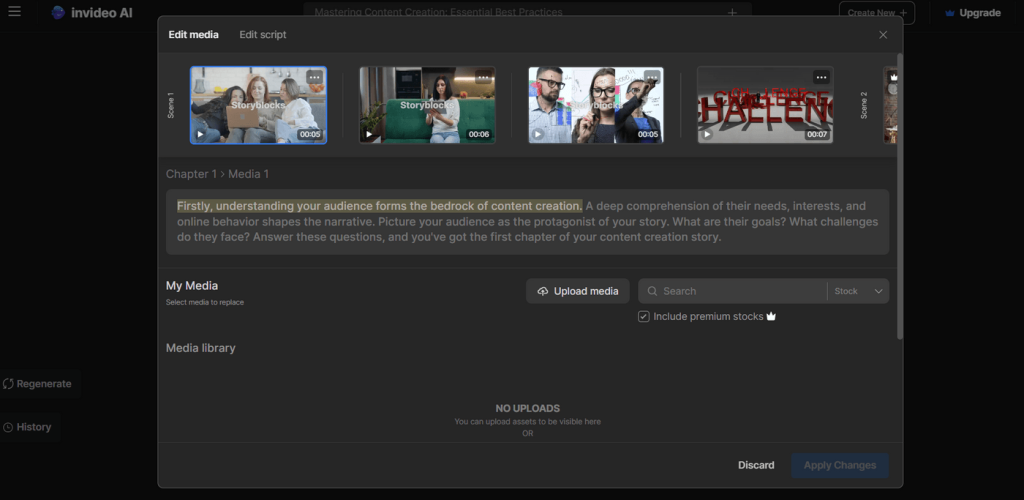
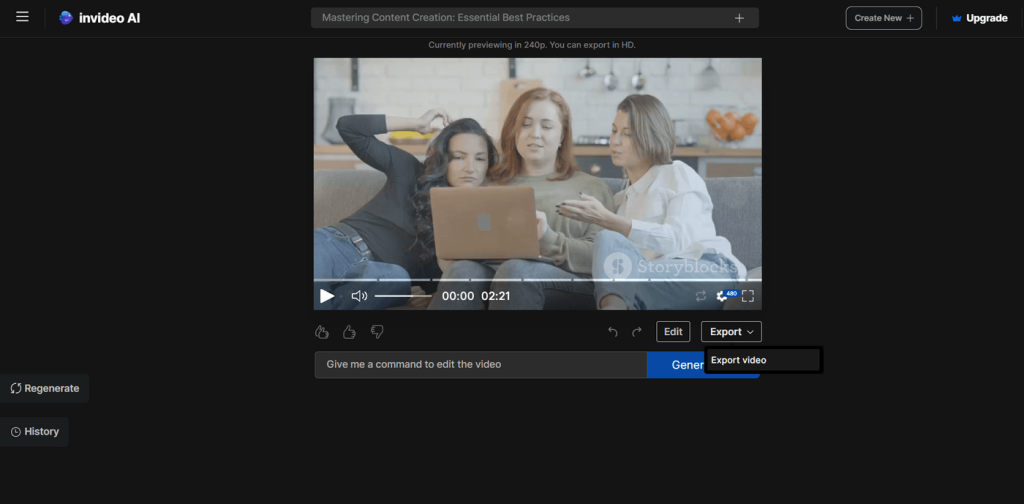
Step 9. When you are happy with the result, click “Export” and select “Export video” from the dropdown.
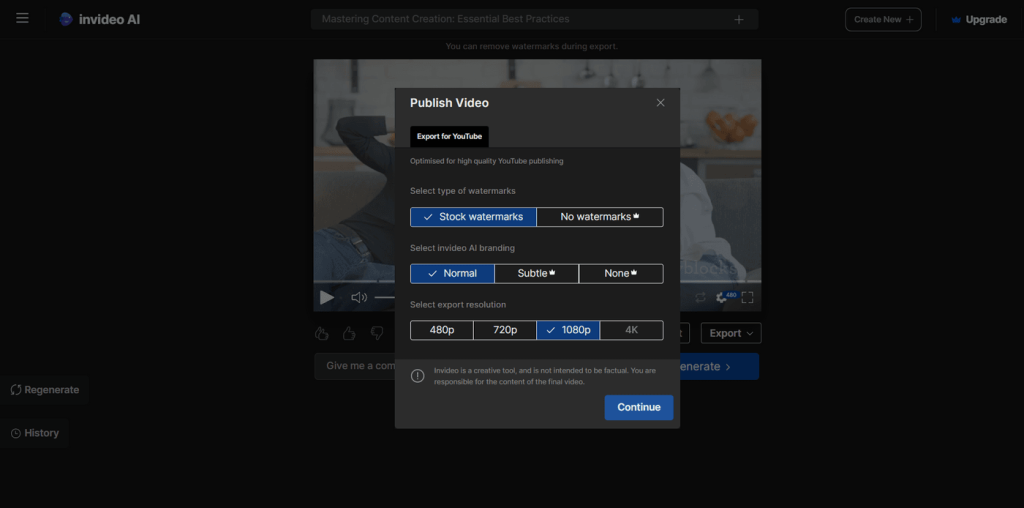
Step 10. A Publish Video window will appear. Choose your watermark preference, InVideo AI branding level, and export resolution. When ready, click “Continue” to download your finished video.
Now, you’ll have the finished video and can download it to your computer. These steps were so easy. Now, you no longer need to worry about how to make a video with the help of ChatGPT.
That’s how you create videos with ChatGPT.
Top Five ChatGPT Alternatives for Video Creation
ChatGPT can help you get started with videos, but you’ll need to patch together third-party GPTs to actually finish the job. That multi-tool workflow gets clunky fast. If you want streamlined control over your video output, these five dedicated tools are worth a look.
1. Lummi video generator
The Lummi video generator is one of the simplest tools you can start with. If you are someone who is trying to find a tool that can help you create videos from text or images. Then this option is for you to choose.
You can pick different styles and scenes. It gives fast video results. It also provides ready templates. You can adjust video length and format. It supports HD quality export. It also lets you add simple animations and effects.
- Pros: Beginner-friendly, fast results, template library, and HD export.
- Cons: Limited creative control, not suited for complex or long-form videos
2. Runway Gen-4.5
Runway calls its latest model, Gen-4.5, the new frontier of video generation, and if we say it’s an all-in-one option for AI video making, it would not be wrong. It offers text-to-video and image-to-video features.
It also supports video-to-video editing. You get strong camera controls like zoom, pan, and motion. It provides high-quality output. You can control style, lighting, and scenes. It also allows frame-by-frame editing and smooth transitions.
- Pros: Professional-grade output, strong camera controls, and versatile editing options.
- Cons: Steeper learning curve and higher cost for heavy usage.
3. Oreate AI Video Generator
Oreate AI is one of the best video makers so far. Reason? Because it is super easy to use. Even an amateur can make videos through it, making it perfect for anyone to use. It helps in simple video creation. You can create videos using text or templates.
It also supports basic AI avatar features. You can add a script or voice. Then choose a style or template. The tool combines everything and creates a video quickly. It is made for quick and simple video generation.
- Pros: Very easy to use, quick turnaround, and good for beginners.
- Cons: No timeline editing or precise control over individual scenes.
4. Hailuo AI
Hailuo AI is a great choice for users who want to create high-quality videos. It is easy to operate, has many functions, and can make your videos look professional and attract a lot of attention.
With this tool, you have all you need to create cinematic videos or advertisements to market a business. Users can create videos by putting a description of their scene into a program with text-to-video capability, and the program will create visual representations of the description. The program’s video quality will also produce smooth-flowing motion as well.
Pros: Cinematic quality, smooth motion, good for marketing and ad content.
Cons: Less flexibility for non-cinematic or template-based content.
5. HeyGen
HeyGen is built for anyone who needs to produce professional-looking videos at scale without a camera or studio.
It specializes in AI avatars and voice cloning, letting you create presenter-style videos simply by typing a script. It also supports video translation into multiple languages, making it a practical choice for global teams and content creators who need to reach different audiences without re-recording.
Pros: Realistic AI avatars, multi-language support, and easy script-to-video workflow.
Cons: Less suitable for cinematic or creative video styles, and the avatar-based format may feel templated.
These are five video generation tools that outperform ChatGPT—no third-party plugins, no switching between tools, just faster and simpler output.
No single tool is perfect for everyone. Each of these tools takes a different approach to video creation, so the right choice depends on what you need. Consider your skill level, the type of content you want to produce, and how much control you want over the final output. Start with one that fits your current project and go from there.
FAQs
Q1. Can ChatGPT create videos by itself?
ChatGPT cannot generate videos natively. It relies on third-party video tools to complete the workflow.
Q2. How can ChatGPT help make YouTube or TikTok videos?
It can write scripts and prompts for YouTube or TikTok videos, but you need an external AI video tool to create the visuals.
Q3. Can ChatGPT’s GPTs make videos automatically?
Not exactly. The GPT itself does not render the video. It connects to an external video tool via API, passes your request to that platform, and the platform handles the actual video creation.
Q4. Can I earn money by uploading AI-generated videos to YouTube?
Of course, you can earn money. Your videos must be original and comply with YouTube’s policies. Adding voice and editing helps.
Q5. How many tokens are needed to create a video?
Token usage depends on the tool. For ChatGPT, generating a script or prompt uses a small number of tokens, while the video itself is created by external tools, most of which run on their own credit systems. Short videos typically use fewer credits, while longer ones require more.
Conclusion
In one word. ChatGPT cannot create videos on its own, but that does not mean it can’t help. Connect it to the right GPT, and you can go from a text prompt to a finished video in just a few steps. For those who want more direct control, the five alternatives in this guide cover a wide range of needs, from quick beginner-friendly output to cinematic-quality results.
Start with the walkthrough in this guide, try a few options, and see what works for you. AI video creation is no longer reserved for professionals. With the right tool, anyone can do it.